






Qhia txog LAMP Stack
LAMP Stack yog ib pawg software qhib qhov chaws uas feem ntau muab nruab ua ke kom lub server thiaj tuaj yeem tuav tau cov website thiab web application uas sau ua PHP. Lub npe no yog los ntawm cov tsiaj ntawv luv ntawm Linux, web server Apache, database MySQL thiab server-side processing language PHP.
Yog koj yog tus pib tshiab thiab xav teeb lub server kom sai, koj siv tau qhov kev pabcuam nruab ib zaug ntawm tus muab kev pabcuam VPS. Tab sis, kev nruab koj tus kheej yuav pab kom koj nkag siab meej txog kev teeb tsa system thiab tswj tau yooj yim dua thaum siv.
Hauv phau ntawv qhia no, koj yuav teeb LAMP Stack rau ntawm Ubuntu 22.04 server. Cov lus txib rau nruab Apache, MySQL thiab PHP siv Ubuntu lub software repository, yog li cov version tiag yuav txawv raws li Ubuntu version, cov repository hloov tshiab thiab lub sijhawm koj khiav cov lus txib. Tam sim no Ubuntu cov ntaub ntawv tseem tsom rau LTS version tshiab tshaj, tab sis thaum tsim nyog tseem sau tseg txog qhov sib txawv ntawm LTS version qub (raws li ubuntu.com).
Yam yuav tsum muaj
Kom ua tiav phau ntawv qhia no, koj yuav tsum muaj ib lub Ubuntu 22.04 server nrog ib tug user account uas tsis yog root tab sis muaj cai sudo, thiab muaj firewall theem pib. Koj tuaj yeem saib phau ntawv qhia teeb tsa Ubuntu Server thawj zaug.
Nkag SSH nrog tus account uas muaj cai sudo thiab hloov kho daim ntawv teev packages ua ntej pib:
sudo apt update
sudo apt upgrade
Kauj ruam 1 — Nruab Apache thiab hloov kho firewall
Apache yog ib lub web server uas siv dav rau Linux. Ubuntu muab pob software apache2 hauv repository software nom tswv (raws li ubuntu.com).
Nruab Apache siv APT:
sudo apt install apache2Thaum raug nug kom lees paub, ntaus Y ces nias ENTER. Tom qab ntawd, xyuas qhov xwm txheej ntawm qhov kev pabcuam:
sudo systemctl status apache2Yog koj siv UFW, sau cov application configurations uas twb muaj lawm:
sudo ufw app listOutput
Available applications:
Apache
Apache Full
Apache Secure
OpenSSHLub ntsiab lus ntawm UFW configurations
- Apache: tsuas qhib port
80rau HTTP. - Apache Full: qhib port
80thiab443rau HTTP thiab HTTPS. - Apache Secure: tsuas qhib port
443rau HTTPS.
Yog tseem tsis tau teeb tsa TLS certificate, koj tsuas pub HTTP kom dhau tau rau kev kuaj thawj zaug:
sudo ufw allow in "Apache"
sudo ufw status
Thaum website muaj TLS certificate lawm thiab yuav tsum muab HTTPS, siv configuration Apache Full lossis qhib HTTPS port raws li network design. Tsis tsim nyog qhib lwm yam kev pabcuam ntxiv yog tseem tsis tau xav tau.
Qhib lub public IP address ntawm server hauv browser:
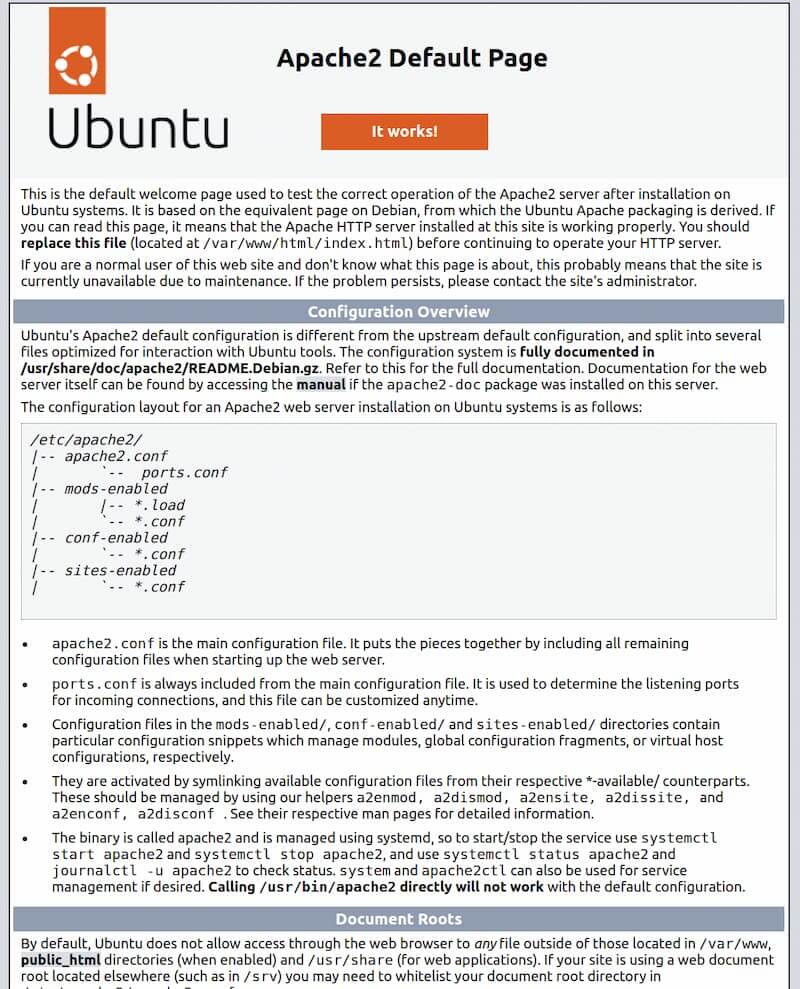
http://your_server_ipYog koj pom Apache nplooj ntawv mặc định, ces web server twb raug nruab lawm thiab tuaj yeem nkag tau hla firewall.
Yuav nrhiav lub public IP address ntawm server li cas
Feem ntau, qhov no yog qhov address uas siv los txuas SSH. Koj tuaj yeem xyuas cov local network addresses siv:
ip addrKom pom lub public address uas ib qho kev pabcuam sab nraud txheeb xyuas, siv tau:
curl https://icanhazip.comYog server nyob tom qab NAT lossis siv cloud network, xyuas ntxiv lub Public IP address hauv tus muab kev pabcuam lub control panel. Tsis yog txhua lub address uas tshwm hauv ip addr yuav nkag tau ncaj qha hauv Internet.
Kauj ruam 2 — Nruab MySQL
MySQL yog lub luag haujlwm khaws cia thiab tswj cov ntaub ntawv rau lub vev xaib. Nruab MySQL server los ntawm lo lus txib:
sudo apt install mysql-serverQhov kev pabcuam feem ntau yuav pib nws tus kheej tom qab nruab tiav. Xyuas xwm txheej los ntawm:
sudo systemctl status mysqlYog tias qhov service tseem tsis tau khiav, pib nws nrog:
sudo systemctl start mysqlHauv Ubuntu, MySQL tus as khauj root hauv lub tshuab hauv zos feem ntau authenticate los ntawm auth_socket. Yog li, koj tuaj yeem nkag MySQL nrog:
sudo mysql -u rootTsis tsim nyog siv tus account root rau ib daim application. Ubuntu qhia kom tsim ib tus account cais uas muaj permission tsim nyog rau txhua lub database (raws li ubuntu.com). Tawm hauv MySQL interface:
exit;Ntawm qee qhov Ubuntu lossis MySQL pob, koj kuj tuaj yeem khiav qhov kev tshuaj xyuas kev nyab xeeb uas muaj lus nug sib tham ntxiv:
sudo mysql_secure_installationCov lus nug thiab cov kev xaiv yuav txawv raws li version. Nyeem txhua lo lus ceeb toom kom zoo; feem ntau yuav tsum rho tawm cov as khauj tsis qhia npe, txwv kev nkag mus root hauv remotely thiab rho tawm lub database sim yog tias lub system muab cov kev xaiv no. Tsis tsim nyog coj cov lus teb ntawm cov version qub los siv yam tsis tshuaj xyuas.
Tsim ib lub database thiab MySQL tus as khauj cais
Qhov piv txwv hauv qab no tsim ib lub database thiab ib tus neeg siv cais rau daim ntawv thov. Hloov cov nqi piv txwv rau koj lub npe thiab tus password uas muaj zog:
sudo mysql -u rootCREATE DATABASE app_db CHARACTER SET utf8mb4 COLLATE utf8mb4_unicode_ci;
CREATE USER 'app_user'@'localhost' IDENTIFIED WITH caching_sha2_password BY 'ThayBangMatKhauManh';
GRANT ALL PRIVILEGES ON app_db.* TO 'app_user'@'localhost';
EXIT;Qhov piv txwv saum toj no siv authentication mechanism caching_sha2_password uas Ubuntu cov ntaub ntawv tau hais txog. Xaiv lwm mechanism tsuas yog thaum application xav tau tiag tiag thiab koj tau kuaj nws qhov compatibility lawm (raws li ubuntu.com).
Tam sim no MySQL server twb tau nruab thiab teeb tsa theem pib lawm. Kauj ruam tom ntej yog nruab PHP.
Kauj ruam 3 — Nruab PHP
Apache siv los xa cov ntsiab lus, MySQL siv los khaws cov ntaub ntawv, hos PHP siv los ua cov cai dynamic. Kom Apache khiav tau PHP thiab PHP txuas tau rau MySQL, nruab cov pob uas tsim nyog:
sudo apt install php libapache2-mod-php php-mysqlUbuntu muab cov pob php, PHP module rau Apache thiab php-mysql hauv software repository. Tom qab nruab tiav, kuaj PHP version tiag nrog:
php -vTsis tsim nyog sau tseg ib version tshwj xeeb rau hauv phau ntawv qhia, vim version yuav nyob ntawm Ubuntu version, cov repository hloov tshiab thiab lub sijhawm nruab. Thaum hloov kho tsab xov xwm no rau hnub tim 2 lub Cuaj Hli 2026, PHP 8.5 thiab PHP 8.4 tseem nyob hauv cov ceg uas tau txais kev txhawb nqa; PHP 8.3 tsuas yuav tau txais security patches mus txog hnub tim 31 lub Kaum Ob Hlis 2027, hos PHP 8.2 mus txog hnub tim 31 lub Kaum Ob Hlis 2026 (raws li php.net). Xaiv qhov version uas Ubuntu repository muab ua ntej, thiab kuaj kom application sib haum.
Pib Apache dua kom paub tseeb tias module thiab kev teeb tsa tshiab tau raug thauj:
sudo systemctl restart apache2Kauj ruam 4 — Tsim Virtual Host rau lub vev xaib
Apache tso cai tsim ntau lub Virtual Host los tuav ntau lub npe sau hauv tib lub server. Hauv qhov piv txwv no, hloov your_domain rau koj lub npe sau tiag tiag thiab xyuas kom DNS record twb taw rau server tus IP address lawm.
Koj kuj tuaj yeem saib phau ntawv qhia taw npe sau rau server.
Hloov chaw siv ncaj qha rau daim nplaub tshev uas tsim los lawm /var/www/html, tsim ib daim nplaub tshev cais rau lub vev xaib:
sudo mkdir -p /var/www/your_domain
sudo chown -R "$USER":"$USER" /var/www/your_domain
Tsim Virtual Host configuration file:
sudo nano /etc/apache2/sites-available/your_domain.confNtxiv qhov kev teeb tsa theem pib hauv qab no:
<VirtualHost *:80>
    ServerName your_domain
    ServerAlias www.your_domain
    ServerAdmin webmaster@localhost
    DocumentRoot /var/www/your_domain

    <Directory /var/www/your_domain>
        AllowOverride All
        Require all granted
    </Directory>

    ErrorLog ${APACHE_LOG_DIR}/your_domain_error.log
    CustomLog ${APACHE_LOG_DIR}/your_domain_access.log combined
</VirtualHost>
Khaws tseg daim ntaub ntawv ces tawm nano los ntawm CTRL+X, nias Y thiab ENTER. Qhib tsuas yog AllowOverride All yog koj yuav tsum siv daim ntaub ntawv .htaccess; yog tsis li, yuav tsum siv ib qho configuration uas txwv ntau dua.
Qhib Virtual Host, xyuas syntax thiab reload Apache:
sudo a2ensite your_domain.conf
sudo apache2ctl configtest
sudo systemctl reload apache2
Yog tsis xav tau Apache lub vev xaib tsim los lawm, koj tuaj yeem lov tes taw lub site ntawd:
sudo a2dissite 000-default.conf
sudo apache2ctl configtest
sudo systemctl reload apache2
Yog tseem tsis muaj lub npe sau, cia lub site tsim los lawm nyob twj ywm lossis tsim ib qho kev teeb tsa sim cais. Thaum siv lub npe sau tiag tiag, xyuas DNS thiab qhib cov chaw nres nkoj kom raug hauv firewall ua ntej nkag mus.
Kauj ruam 5 — Kuaj PHP nrog Apache
Tsim daim ntaub ntawv kuaj PHP hauv daim nplaub tshev ntawm lub vev xaib:
nano /var/www/your_domain/info.php<?php
phpinfo();Qhib http://your_domain/info.php hauv browser. Yog pom nplooj ntawv qhia txog PHP, txhais tau tias Apache twb ua tau daim ntaub ntawv PHP lawm.
Tom qab kuaj tiav, rho tawm daim ntaub ntawv no vim nws qhia ntau yam ntaub ntawv teeb tsa uas yuav pab tau cov neeg tawm tsam:
rm /var/www/your_domain/info.phpKauj ruam 6 — Cov kauj ruam txuas ntxiv
- Khoos HTTPS siv daim ntawv pov thawj TLS uas siv tau ua ntej muab lub vev xaib coj los siv tiag.
- Qhib tsuas yog cov chaw nres nkoj uas tsim nyog hauv UFW thiab tsis pub MySQL nkag tau hauv Is Taws Nem yog tias daim ntawv thov tsis xav tau.
- Siv ib tus as-qhauj MySQL cais rau txhua daim ntawv thov, nrog cov cai tsawg kawg uas tsim nyog.
- Teeb tsa kev thaub qab ntawm lub hauv paus ntaub ntawv thiab tshuaj xyuas qhov muaj peev xwm rov qab tau tsis tu ncua.
- Hloov kho Ubuntu, Apache, MySQL thiab PHP raws li koj tus txheej txheem saib xyuas.
Koj tau ua tiav cov feem tseem ceeb ntawm LAMP Stack hauv Ubuntu lawm: Apache faib lub vev xaib, MySQL tswj cov ntaub ntawv thiab PHP ua cov ntsiab lus hloov pauv.
Cov ntaub ntawv siv
