Close Menu
  • Home
  • Life style
    • Celebrities
    • Exercise & Training
    • Healthline
  • Exploration
    • Beauty tips
    • Business
    • Travel guides
    • Fashion
    • Technology
  • Web tutorials
    • Hosting & Servers
    • Blogger guides
    • WordPress guides
  • English
    • Tiếng Việt
    • Hmoob
    • English
Facebook YouTube X (Twitter) Instagram
Trending
  • Protecting Servers Against AI Attacks: From Identity to the Supply Chain
  • Late-Summer Travel in Vietnam 2026: Plan a Less Crowded, Less Rainy Itinerary
  • Protecting WordPress Against AI Bots and Unknown Crawlers
  • Install Let’s Encrypt SSL on Ubuntu with OpenLiteSpeed and Automatic Renewal
  • AI-Powered Operational Optimization for Small Businesses: A 30-Day Testing Framework
  • Optimizing a Blog for Google AI Overviews and AI Mode
  • Diagnosis and Treatment of Severe Pneumonia: CAP, HAP, VAP, and Aspiration Pneumonia
  • How to Build a Newsletter for Your Blog: WordPress, Substack, or an Email Platform?
Facebook YouTube X (Twitter) Instagram
SaibABCSaibABC
Chú thích cho quảng cáo
  • Home
  • Life style
    1. Celebrities
    2. Exercise & Training
    3. Healthline
    4. View All

    Comparing Lionel Messi and Cristiano Ronaldo: Their Complete Careers

    30/08/2026

    Celebrities Move to Video Podcasts: The New Era of Talk Shows

    30/08/2026

    Taylor Swift Protects Her Voice Against AI: The Fight Against Deepfakes

    30/08/2026

    15 Most Popular Celebrities in the World of All Time

    30/08/2026

    Five-Minute Office Exercises: A Snack-Sized Movement Schedule

    30/08/2026

    Best Exercises to Strengthen Your Core: From Beginner to Advanced

    30/08/2026

    Diagnosis and Treatment of Severe Pneumonia: CAP, HAP, VAP, and Aspiration Pneumonia

    30/08/2026

    Preventing Dengue at Home: A Mosquito Control and Severe Symptom Checklist

    30/08/2026

    Self-Directed Health with Wearables: Use Data Correctly, Do Not Self-Diagnose

    30/08/2026

    Empowering Health: Prioritize Early Cancer Screenings for Better Well-being

    30/08/2026

    Diagnosis and Treatment of Severe Pneumonia: CAP, HAP, VAP, and Aspiration Pneumonia

    30/08/2026

    Preventing Dengue at Home: A Mosquito Control and Severe Symptom Checklist

    30/08/2026

    Preparing for the Business Peak Season: Capacity, Staffing, and Cash Flow Spreadsheet

    30/08/2026

    Comparing Lionel Messi and Cristiano Ronaldo: Their Complete Careers

    30/08/2026
  • Exploration
    1. Beauty tips
    2. Business
    3. Travel guides
    4. Fashion
    5. Technology
    Featured

    Late-Summer Travel in Vietnam 2026: Plan a Less Crowded, Less Rainy Itinerary

    By Nuj Coom30/08/2026
    Recent

    Late-Summer Travel in Vietnam 2026: Plan a Less Crowded, Less Rainy Itinerary

    30/08/2026

    AI-Powered Operational Optimization for Small Businesses: A 30-Day Testing Framework

    30/08/2026

    How to Block OTA Updates on iPhone and iPad Using Block OTA

    30/08/2026
  • Web tutorials
    1. Hosting & Servers
    2. Blogger guides
    3. WordPress guides
    4. View All

    Protecting Servers Against AI Attacks: From Identity to the Supply Chain

    30/08/2026

    Install Let’s Encrypt SSL on Ubuntu with OpenLiteSpeed and Automatic Renewal

    30/08/2026

    How to Install the LAMP Stack: Linux, Apache, MySQL, and PHP on Ubuntu

    30/08/2026

    How to secure Apache with Let’s Encrypt on Ubuntu

    30/08/2026

    Optimizing a Blog for Google AI Overviews and AI Mode

    30/08/2026

    Repurposing Blog Content: Turn One Article into 5 Formats

    30/08/2026

    12 Best AI Content Writing Tools for Bloggers in 2026

    30/08/2026

    How to Get Your Blog Into Google Discover After the Google Discover Core Update 2026

    30/08/2026

    Protecting WordPress Against AI Bots and Unknown Crawlers

    30/08/2026

    How to Install the LAMP Stack: Linux, Apache, MySQL, and PHP on Ubuntu

    30/08/2026

    12 Best AI Content Writing Tools for Bloggers in 2026

    30/08/2026

    Check WordPress Plugins Before Updating: A 24-Hour Process

    30/08/2026

    Protecting Servers Against AI Attacks: From Identity to the Supply Chain

    30/08/2026

    Protecting WordPress Against AI Bots and Unknown Crawlers

    30/08/2026

    Install Let’s Encrypt SSL on Ubuntu with OpenLiteSpeed and Automatic Renewal

    30/08/2026

    Optimizing a Blog for Google AI Overviews and AI Mode

    30/08/2026
  • English
    • Tiếng Việt
    • Hmoob
    • English
SaibABCSaibABC
Home»Exploration»Technology»How to Block OTA Updates on iPhone and iPad Using Block OTA
Technology 3 Mins ReadNo Comments

How to Block OTA Updates on iPhone and iPad Using Block OTA

Nuj CoomBy Nuj Coom
Facebook Twitter Pinterest LinkedIn Tumblr Email
Chú thích cho quảng cáo

Contents

  1. Turn off automatic updates first
  2. Install the Block OTA configuration
  3. Restart and check
  4. Remove the Block OTA configuration
  5. References

If you still receive iOS or iPadOS update notifications after turning off automatic updates in Settings, a Block OTA configuration can help hide OTA updates on iPhone and iPad. However, this is a configuration provided by a third party; install it only when you understand its source, and always keep a manual update option available when needed.

Here’s how to install the Block OTA configuration, check its status, and remove it so your device can receive updates normally again.

Turn off automatic updates first

On your iPhone or iPad, open Settings > General > Software Update > Automatic Updates. Turn off the options to automatically download or automatically install iOS/iPadOS updates. Apple still recommends updating software to receive security patches and bug fixes (according to Apple Support).

Install the Block OTA configuration

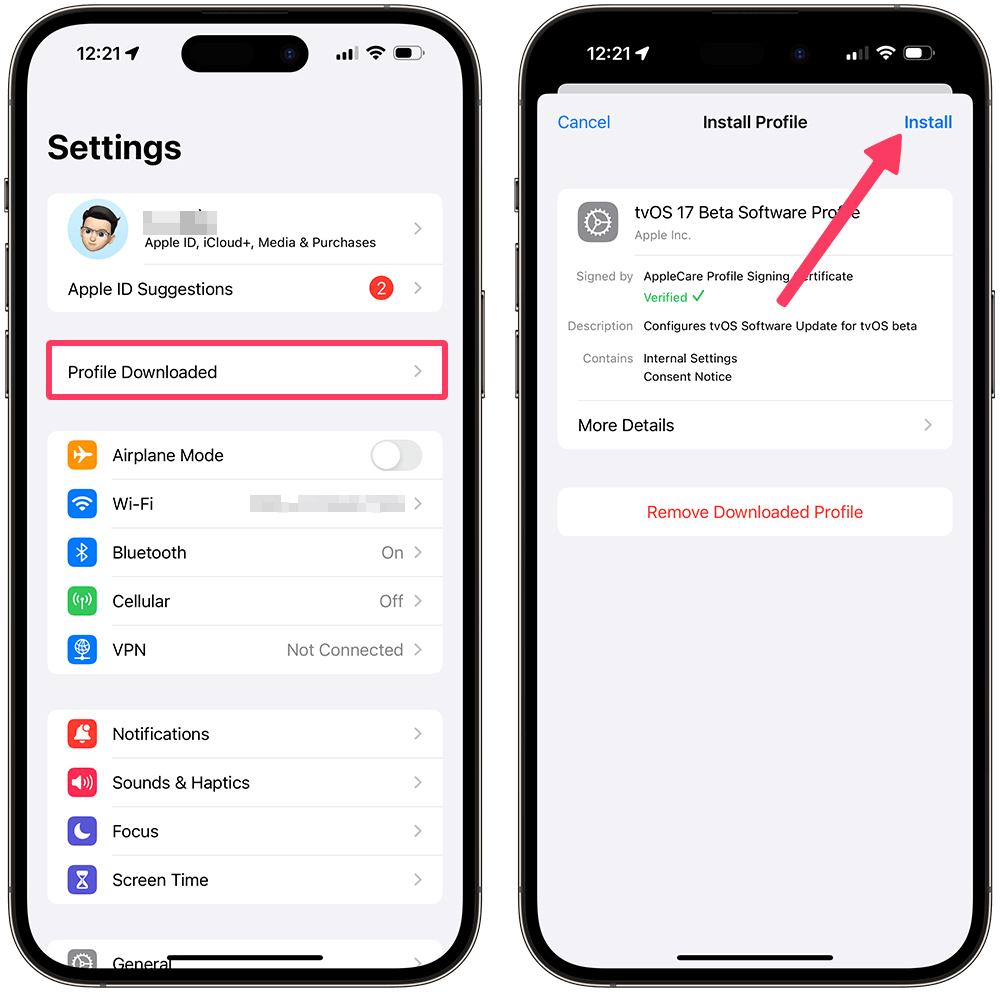
On your iPhone or iPad, open the Block OTA configuration download page and tap the download button. The device will notify you when the configuration has been downloaded. Open Settings, tap Profile Downloaded or the recently downloaded profile, then follow the on-screen instructions to install it. You can download the configuration from the Beta Profiles Block OTA page (according to Beta Profiles).

Open the Block OTA download page

Note: This configuration may appear under the name tvOS beta profile. This is how the OTA-blocking method works and does not mean that the device is being upgraded to tvOS. Do not install configuration files from unknown sources.

Chú thích cho quảng cáo
Block OTA configuration installation screen on iPhone

Restart and check

After installing the configuration, restart your iPhone or iPad. Then go to Settings > General > Software Update. If the screen displays “iOS is up to date” or no OTA update is available, the configuration is working as described by the provider (according to Beta Profiles).

If the update still appears, check Settings > General > iPhone/iPad Storage and delete the downloaded update file if present, then check again.

You do not need to keep changing the device’s date and time. Setting the date before a fixed point such as December 14, 2026 is not appropriate guidance for the current process and may cause errors with other services. Leave Set Automatically turned on.

Remove the Block OTA configuration

When you want your device to receive and install updates normally, remove the configuration as follows:

  1. Open the Settingsapp.
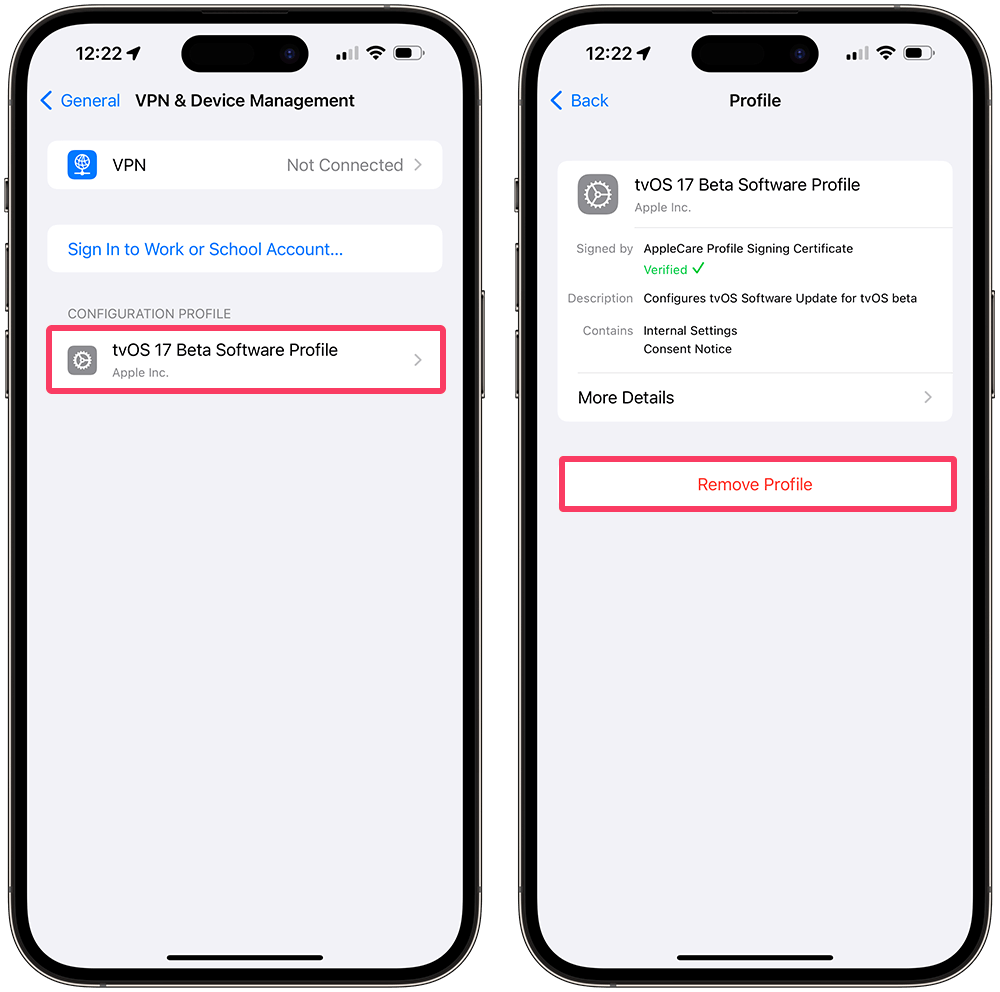
  2. Select General > VPN & Device Management.
  3. Tap the displayed Block OTA profile or tvOS beta profile, select Remove Profile, then enter the device passcode if prompted.
  4. Restart the device, then go to Settings > General > Software Update to check again.

On devices running iOS 16.4 or iPadOS 16.4 and later, if you only want to stop receiving official beta updates, go to Settings > General > Software Update > Beta Updates > Off. For earlier versions, Apple instructs users to remove the beta profile under VPN & Device Management (according to Apple Support).

Beta profile removal screen on iPhone

After removing the profile, check again at Settings > General > Software Update. If you installed an iOS or iPadOS beta using a computer, Apple says you need to restore the device to remove the beta and return to the current public version; back up your data before proceeding (according to Apple Support).

Recommendation: Delaying updates may cause the device to miss security patches. OTA should only be blocked for as long as necessary, and the configuration should be removed when you want to update again.

References

  • Beta Profiles – Block OTA updates for iPhone and iPad
  • Apple Support – How to remove iOS or iPadOS beta software
  • Apple Support – Update your iPhone or iPad

Chú thích cho quảng cáo
Apple Block OTA iOS iPad iPadOS iPhone OTA Updates
Share. Facebook Twitter Pinterest LinkedIn Tumblr Email
Previous ArticleWhat Is LAMP Stack? Discover the Power of LAMP Stack
Next Article 12 Best AI Content Writing Tools for Bloggers in 2026
Nuj Coom
  • Website
  • Facebook
  • X (Twitter)
  • Instagram

Related Posts

Exploring ChatGPT: A Comprehensive Guide on How to Use ChatGPT

11/01/2024
Add A Comment
Leave A Reply Cancel Reply

Latest posts

Use First-Party Data to Understand Readers While Respecting Privacy

HTTP/3 hosting: Measuring QUIC performance and properly configuring HTTP/2 fallback

Five-Minute Office Exercises: A Snack-Sized Movement Schedule

2025 E-Commerce Law: Compliance Checklist

Preventing Dengue at Home: A Mosquito Control and Severe Symptom Checklist

Advertisement
Chú thích cho quảng cáo

SUBSCRIBE TO UPDATES

Get the latest creative news from SaibABC.Com on web tips, design, and business.

Copyright © 2024. Designed by NujCoom.
  • Home
  • Contact
  • Privacy
  • Tiếng Việt
  • Hmoob

Type above and press Enter to search. Press Esc to cancel.